How to Make Slow-Motion Videos: a Complete Guide
To create and preserve beautiful moments, inventors have created cameras everyone likes to buy today. In the 21st century, slow-motion cameras have become extremely popular because of their wide range of application areas. The demand for slow-motion cameras has ushered manufacturers to develop them continuously. In this article, we'll explore how do slow-motion cameras work, and the different ways to make slow-motion videos.
What is a Slow-Motion Camera?
A camera that captures video at a reduced speed is called a slow-motion camera. The human eye cannot capture all details in their surroundings. Even if it does, the brain may be unable to process it because of the speed at which an event occurs.
This is where a slow-motion camera comes in. This camera feature can help people slow the speed of a video. People use this feature to make incredible effects in movies and ads. Moreover, this feature also helps people understand things their eyes may have missed. In slow motion, anyone can see what truly happened in their surroundings frame-by-frame.
How Do Slow-Motion Cameras Work?
The slow-motion cameras capture a higher number of FPS than standard cameras. The FPS of a regular camera is usually 24, 30 or 60. In contrast, slow-motion cameras have a FPS of 120, 240, or even higher, depending on the camera. The motion is slowed when the footage is played back at the standard frame rate.
You can find the use of these cameras in various fields around the world. In sports, it is used to show incredible shots of players or make decisions that a referee could not complete correctly. Slow-motion shots are frequently used in film-making to make dramatic or stylized effects.
How Much Does a Slow-Motion Camera Cost?
Whether it's a camera or anything else, the price varies significantly depending on the features or model.
Camera brand, resolution, frame rate, and additional features each change the price of a camera. Because the better technology a camera has, the better the image it creates. Having better technology means the camera price will also be high.
Following is a Rough Overview of the Price Ranges for Slow-Motion Cameras
Consumer-Grade Cameras
Consumer-grade slow-motion cameras might offer basic slow-motion capabilities. These cameras may cost between $200 to $800.
Prosumer and Professional Cameras
These cameras have more advanced slow-motion features. Considering the multiple parts of the camera, the prices can range from $1,000 to $5,000 or more.
High-End and Cinema Cameras
These are the cameras that are used in film-making and professional video production. They can cost anywhere from $10,000 to well over $100,000. These cameras are typically used in industries where high-quality slow-motion footage is a critical requirement.
So if you want to buy a slow-motion camera, first understand your goal. Buying an expensive camera to create minor footage is foolish. Many cameras, even those available are mobile phones, can produce similar effects a slow-motion camera would make. So first check your budget and requirements and only then buy a camera for yourself.
Know that as technology advances, the prices of old cameras also change. New technology outperforms the old one; hence as time passes, the prices of cameras may increase or decrease.
How to Make Slow-Motion Videos?
The process of making a slow-motion video is straightforward. The first step is capturing the videos in higher FPS. The second step is adjusting the playback speed. Following is a general guide on how to do it.
Step 1. Capture Footage at High Frame Rate
(1) Camera Choice
Use a camera that supports higher frame rates. Many devices with cameras offer slow-motion recording features.
(2) Access Slow-Motion Settings
Access the slow-motion recording mode of your camera. This mode might be labeled "Slow Motion", "Slo-Mo", or similar.
(3) Select Frame Rate
Choose a higher frame rate for recording. Standard options include 120fps, 240fps, or even higher, depending on your camera's capabilities. The higher the frame rate, the smoother the slow-motion effect will be.
(4) Record
Start recording your video footage in slow motion mode. Remember that slow-motion recording typically results in shorter video clips due to the increased frame rate.
Step 2. Edit the Slow-Motion Video
(1) Transfer Footage
Transfer the recorded video footage to your computer or a device.
(2) Choose Video Editing Software
Use professional video editing software like Adobe Premiere Pro, Final Cut Pro, or a free program like DaVinci Resolve.
(3) Import Footage
Import the recorded video into your chosen editing software.
(4) Adjust Playback Speed
- In the video editing software, place the video clip on the timeline.
- Look for the option to change the clip's playback speed or time stretch.
- Slow down the clip by reducing the playback speed.
For example, if you recorded at 120fps and want to make a slow-motion effect at 24fps, you'll slow the clip down to 20% of its original speed.
(5) Export
Once you're satisfied with the slow-motion effect, export the edited video. Choose your desired output format and settings.
Know that the frame rate of your camera dramatically affects the quality of your slow-motion video. Check various cameras and experiment with them. Only then use the camera that best suits your needs.
Why Choose the SJCAM SJ10 Pro for Slow Motion?
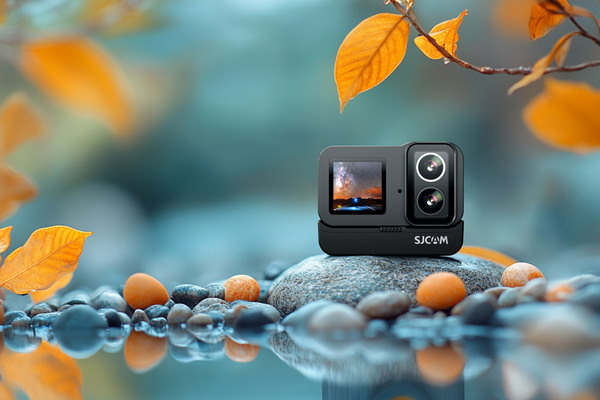
The SJCAM SJ10 Pro action camera offers advanced features tailored for slow-motion videography.
- It offers dual screens, which can be helpful for vloggers and those who want to frame shots while recording.
- It supports 4K video recording at 60fps, suggesting that it can capture high-quality slow-motion footage.
- It features a 20MP sensor and offers various shooting modes.
- It has built-in electronic image stabilization (EIS) to help stabilize footage.
For more details, visit the SJCAM SJ10 Pro product page.
Conclusion
Mastering Low-Light Photography: Techniques and Tips for Stunning Nighttime Shots
How to Make Time-Lapse Videos: a Complete Guide